
US TV & Radio Free2.95 - Google Play
You'll be able to see results in few seconds.
Publisher Description
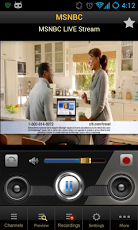
US TV allows you to watch many free United State television channels on your Android smartphone/tablet. Main features are:- Support almost all popular USA television channels including: CNN US, CNN International, BBC UK, BBC News...and much more channels being updated daily. We also support famous international channels- Automatically update new channels.- EXCLUSIVE FEATURE: Record your favorite program in real-time without any quality loss (*)!- Support for adding user channel manually.- Manage favorite channels.- Sharing with Facebook friends.- Preview your favorite channels before watching- Does not require flash player.- Display technical information about a channel (tap on any where in the screen)- Downloadable skins.- Fully Hardware Accelerated on Android 4.1 and onwards, allowing smoothest viewing experience and better battery life. You can watch TV for hours before having to recharge. IF YOU CAN GET AUDIO BUT VIDEO IS BLANK OR SCRAMBLED, PLEASE TURN OFF THIS FEATURE AND USE S/W DECODING INSTEAD.- Delete unwanted channel.- Please use your device in portrait modeto see all application's options.(*) Due copyright protection, some channels are not recordable********IMPORTANT***************Before give us a negative review (or rating), make sure you are connecting to the internet via unfiltered or proxified network.USTV will mostly open connection to streaming server at TCP port 1935 (RTMP Protocol). So if you see most channels are offline, this is very likely that you are blocked by firewall (most company will do so). Please contact your administrator for help before give us a negative review.Thank you !**********************************************ANTIVIRUS & SECURITY PERMISSIONS***************For those who worry about permissions, we need the following permissions for USTV to work properly:- Modify system settings: This is used to adjust screen brightness and screen orientation lock (eg, lock screen orientation while watching TV, change brightness in landscape mode)- Read phone status: This is used to pause playback and mute audio when you received a phone call.USTV is ad-supported by Google AdMob. We never show advertising outside of the application as well as collect user data. Unfortunately, some anti-viruses have false positive identified our application as adware. Please do not misunderstand USTV with other malware application.********************************************NOTE***************We collect channel data from the internet so some channels may work, some may not work at all depend on your geographic location and your internet connection speed. This application won't suppose to replace your cable television. We are working very hard to keep the channel list updated, however please don't expect a cable television level of stability and performance.Using USTV is FREE. However, it will consume a lot of data traffic and may be charged by your operator, consult your operator for pricing. We recommend using USTV via WiFi or unlimited data plan.Thank you !DMCA Notice:US TV Free does not own or host any content. It simply aggregates links in a convenient, user-friendly interface. Please email any questions or concerns to admin@mdcgate.com before sending to Google. We will be more than happy to comply with any DMCA requests within 24 hours.
About US TV & Radio Free
The company that develops US TV & Radio Free is PPCLINK Mobile Software. The latest version released by its developer is 2.95.
To install US TV & Radio Free on your Android device, just click the green Continue To App button above to start the installation process. The app is listed on our website since 2013-07-01 and was downloaded 0 times. We have already checked if the download link is safe, however for your own protection we recommend that you scan the downloaded app with your antivirus. Your antivirus may detect the US TV & Radio Free as malware if the download link to com.mdc.ustv is broken.
How to install US TV & Radio Free on your Android device:
- Click on the Continue To App button on our website. This will redirect you to Google Play.
- Once the US TV & Radio Free is shown in the Google Play listing of your Android device, you can start its download and installation. Tap on the Install button located below the search bar and to the right of the app icon.
- A pop-up window with the permissions required by US TV & Radio Free will be shown. Click on Accept to continue the process.
- US TV & Radio Free will be downloaded onto your device, displaying a progress. Once the download completes, the installation will start and you'll get a notification after the installation is finished.
Program Details
System requirements
Download information
Pricing
Version History
version 2.95
posted on 2013-07-01
version 2.95
posted on 2013-07-01
Several fixes and updates
Disclaimer
Official Google Play Link
We do not host US TV & Radio Free on our servers. We did not scan it for viruses, adware, spyware or other type of malware. This app is hosted by Google and passed their terms and conditions to be listed there. We recommend caution when installing it.
The Google Play link for US TV & Radio Free is provided to you by apps112.com without any warranties, representations or guarantees of any kind, so access it at your own risk.
If you have questions regarding this particular app contact the publisher directly. For questions about the functionalities of apps112.com contact us.
